
High-Fidelity sharpening using Unsharp Masking. Preserves original format and dimensions.
Drag & Drop Blurry Image
Sharpness Controls
Higher = Sharper. (Recommended: 50-150%)
Size of details to sharpen. (Recommended: 1.0 - 3.0)
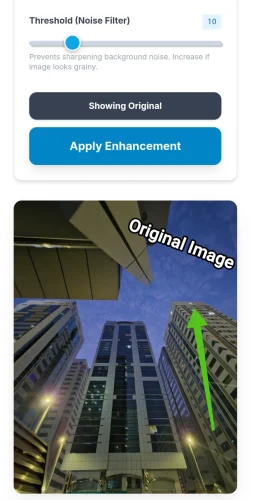
Prevents sharpening background noise. Increase if image looks grainy.
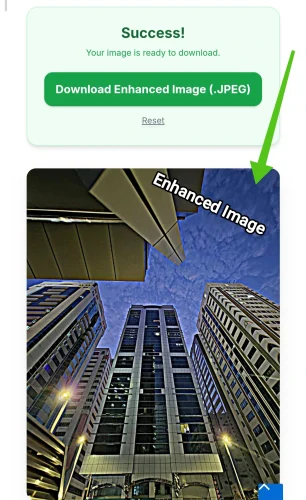
Success!
Your image is ready to download.
Image Enhancer Online – Improve Image Quality Instantly
The Image Enhancer tool on ToolGora is designed to help you improve blurry, dull, or low-quality images directly in your browser. This tool allows you to sharpen images, enhance clarity, and bring back details without changing the original image format or dimensions. Everything works locally on your device, which means your images are never uploaded to any server. This makes the tool fast, private, and safe for personal and professional use.
Whether you are fixing photos taken in low light, improving scanned documents, or sharpening images for websites and social media, this Image Enhancer gives you full control. You can adjust sharpening strength, detail thickness, and noise filtering using simple sliders. The live preview lets you see changes instantly before downloading the final image.
Unlike basic image editors, this tool uses advanced unsharp masking logic to enhance edges while protecting smooth areas. This helps avoid over-sharpening and unwanted grain. The result is a clean, clear image that looks natural and professional. If you also work with image sizes or formats, you can combine this tool with our Image Resizer or Image Compressor for a complete workflow.
The Image Enhancer supports common formats like JPG, PNG, and WebP. Since the original format is preserved, you do not need to worry about compatibility issues. This makes it ideal for designers, developers, students, photographers, and content creators who want better image quality without installing heavy software.
How to Use the Image Enhancer
Using the Image Enhancer is simple and does not require any technical skills. First, drag and drop your image into the upload area or click to browse files from your device. Once the image loads, you will see a preview along with enhancement controls on the left side.
Adjust the Amount slider to control sharpening strength. Higher values make the image sharper, while lower values keep it subtle. Next, use the Radius slider to define how thick or fine the sharpened details should be. Finally, adjust the Threshold slider to reduce noise and avoid sharpening flat areas.
You can hold the compare button to instantly see the original image and compare it with the enhanced version. When you are satisfied, click the apply button to process the full-resolution image. After processing, download the enhanced image in the same format as the original.
This tool is perfect when combined with other utilities available on ToolGora. For example, after enhancing image quality, you can reduce file size using the Image Compressor, add branding with the Image Watermark, or convert formats using the Format Converter.
The Image Enhancer is built for speed, privacy, and quality. No registration is required, no files are uploaded, and no watermarks are added. You get full control over how your images look, making this tool a reliable solution for everyday image enhancement needs.
Key Features
- Enhance blurry and low-quality images instantly
- Advanced sharpening with noise control
- Live preview before applying changes
- Preserves original image format and resolution
- No uploads – processing happens in your browser
- Supports JPG, PNG, and WebP images
- Fast, secure, and completely free to use
FAQ
Does this tool increase image resolution?
No, this tool enhances clarity and sharpness without changing the original resolution or dimensions.
Are my images uploaded to a server?
No. All image processing happens directly in your browser, ensuring complete privacy.
Can I use this tool on mobile devices?
Yes, the Image Enhancer works on modern mobile and desktop browsers.
Is the enhanced image free to download?
Yes, there are no limits, watermarks, or hidden charges.